Teraco PowerPoint Template: Build Confident Presentations
Putting together a presentation that truly connects with an audience often feels like a balancing act. You want your data to be clear, your visuals to be engaging, and the overall flow to feel natural. That is where a thoughtful design template makes all the difference. The Teraco PowerPoint Template is built to help you create slides that are both polished and practical, without requiring hours of design work.
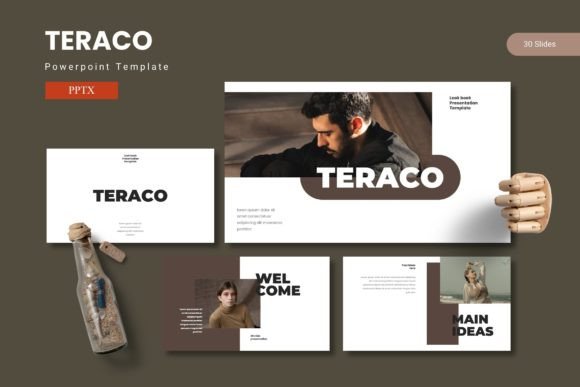
This template offers 150 total slides spread across five premade color variations, with 30 slides in each set. That structure alone means you are not starting from scratch every time you need a new deck. Whether you are preparing a quarterly business review, a classroom lecture, or a portfolio for a creative project, Teraco gives you a strong foundation to work from.
Present with Purpose: What Teraco Brings to Your Slides
The core idea behind Teraco is simple: help you share ideas with confidence. The layouts combine data, graphics, and content in a way that feels cohesive rather than cluttered. Each slide is designed with pixel-perfect illustrations and handcrafted infographics that are fully resizable and editable. That means you can tweak colors, move elements, and adjust text to match your brand or personal style without worrying about breaking the design.
One of the standout features is the use of master slides. Instead of manually adjusting every slide one by one, you can set a consistent look across your entire presentation. This saves time and ensures that fonts, colors, and positioning stay uniform. For someone who presents regularly, that consistency alone can make a big difference in how your message is received.
Picture placeholders with drag-and-drop functionality are another practical touch. You can quickly insert your own images, screenshots, or graphics without needing to resize or crop them manually. The template also includes dedicated gallery and portfolio slides, which are especially useful if you need to showcase work samples, product images, or project highlights in a clean layout.
Built for Flexibility Without Sacrificing Quality
Teraco comes with five color scheme options, so you are not stuck with a single palette. If you are presenting to a client with specific brand colors, you can pick a variation that closely matches or easily adjust the existing scheme. Section break slides are also included, which help you separate topics or chapters in a longer presentation. This is a small detail that adds a professional touch and makes your content easier to follow.
The template is delivered as five separate PPTX files, each containing 30 slides. This format makes it straightforward to choose the color variation you need and start editing right away. A readme file is also included in the folder, along with font and photo information. That is helpful if you need to install specific fonts or want to understand where the placeholder images came from.
Real-World Uses: From Pitch Decks to Portfolios
Different people will find different uses for Teraco, and that versatility is part of its appeal. Here are a few realistic scenarios where this template can support your goals:
- Business pitches and proposals: If you are an entrepreneur or freelancer pitching to potential clients, having a polished deck can make a strong first impression. The infographic slides let you present financial projections or market data in a way that is easy to understand, while the clean layouts keep the focus on your message.
- Educational presentations: Teachers, trainers, and workshop facilitators often need to break down complex topics into digestible slides. The section breaks help organize your material, and the customizable layouts allow you to mix text with diagrams or images without overcrowding the slide.
- Creative portfolios: For designers, photographers, or marketers, the gallery and portfolio slides provide a structured way to display your work. You can drag and drop your best pieces into the placeholders and add brief descriptions, giving potential clients or employers a clear view of your capabilities.
- Internal reports and team updates: Small business owners and managers can use the data-driven layouts to share progress updates, sales figures, or project milestones with their teams. The consistent design helps keep the information organized and professional.
In each of these cases, the template saves you from having to design every slide from scratch. You can focus on refining your content and practicing your delivery, rather than worrying about whether your slides look cohesive.
What to Keep in Mind When Working with This Template
Before you dive in, there are a few practical considerations worth noting. First, because the template is designed around master slides, it helps to understand how PowerPoint handles these features. If you are new to using master slides, taking a few minutes to explore how they work will make your editing process much smoother. The readme file included with the download covers the basics, so start there.
Second, while all graphics are resizable and editable, changing the layout too much may require some manual adjustments. If you are comfortable with PowerPoint, this will not be an issue. If you are less experienced, sticking with the existing layouts and simply swapping out text and images is the fastest path to a polished result.
Third, the template includes font and photo information, so make sure you have the recommended fonts installed on your system before you start editing. This will prevent any formatting surprises when you open the file on a different computer or share it with a colleague.
Finally, consider your audience when choosing a color scheme. The five variations give you flexibility, but picking one that aligns with your content and context will help your presentation feel intentional. A professional pitch might call for a more subdued palette, while a creative showcase could benefit from something bolder.
Making the Most of Teraco in Your Workflow
If you are someone who creates presentations regularly, having a reliable template like Teraco can streamline your process. You can build a library of decks using different color variations, each tailored to a specific purpose or client. Over time, you will develop a feel for which layouts work best for different types of content, and editing will become faster with each use.
For beginners, the template provides a safe starting point. You do not need to worry about design principles because the hard work is already done. You simply fill in your content, drag in your images, and adjust the text. As you grow more comfortable, you can start experimenting with customizations to make each deck feel more personal.
For professionals who already have a strong sense of what works, Teraco offers efficiency without limiting creativity. The handcrafted infographics and pixel-perfect illustrations give you a solid base, and the flexibility to resize and edit means you are never locked into a rigid format.
Why Teraco Stands Out Among Presentation Templates
There are plenty of PowerPoint templates available, but what makes Teraco worth considering is the combination of volume and variety. With 150 slides across five color schemes, you have enough material to cover a wide range of topics without repeating the same layouts. The inclusion of section breaks, gallery slides, and infographic elements means you are not just getting basic text slides, you are getting a toolkit designed for real-world communication.
The emphasis on master slides also sets it apart. Many templates give you individual slides that look good but are difficult to keep consistent when you need to make global changes. Teraco is built with a structure that supports you as your presentation evolves, whether you are adding a new section or adjusting the entire color palette.
Ultimately, the value of a template like this comes down to how much time it saves you and how confident you feel presenting your slides. If you can open a file, make a few edits, and end up with a presentation that looks like it took hours to design, then the template has done its job.
Whether you are preparing for a client meeting, a classroom session, or a creative showcase, the Teraco PowerPoint Template gives you the structure and flexibility to share your ideas clearly. With minimal effort, you can produce slides that feel intentional, professional, and tailored to your audience.