Duloga: Powerpoint Template for Confident Presentations
You have a big idea. Maybe it is a product launch, a brand proposal, or a quarterly report that needs to land with impact. You open PowerPoint, stare at the blank slide, and wonder how to turn raw data into something people actually remember. That is where Duloga - Powerpoint Template steps in. Designed for clarity and visual punch, this template gives you 150 slides across five color schemes, each built to help you communicate ideas without the usual friction. Whether you are a marketer pitching a campaign or a small business owner presenting to investors, Duloga offers a structure that lets your content shine.
What Makes Duloga Stand Out in a Crowded Template Market
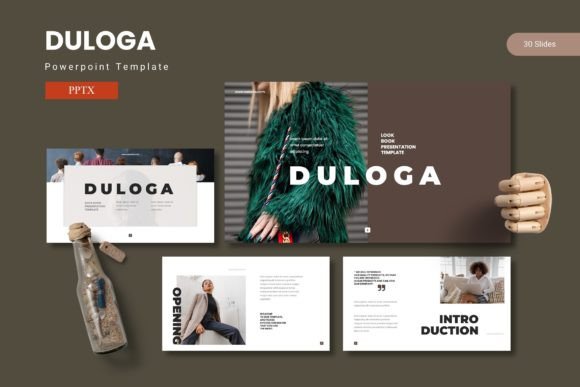
PowerPoint templates are everywhere. Most of them look the same. Duloga takes a different approach. It blends modern typography, clean layouts, and handcrafted infographics into a system that feels both professional and approachable. The template leans on a sans serif font family that reads well on screens and printed materials alike. This typeface gives the deck a crisp, contemporary personality while keeping readability high. In an age where audiences scan rather than read, every typographic choice matters.
The visual style of Duloga is polished without being stiff. Section break slides use generous white space and bold headings to signal transitions. The infographic slides are not afterthoughts. They are built from master slides, meaning you can edit them once and see changes ripple through the entire deck. That saves hours, especially when you are working under a tight deadline. The handcrafted illustrations are fully resizable and editable, so you can tweak colors, sizes, and positions without losing quality. This is not a template that locks you into a rigid format. It gives you a foundation and then steps out of your way.
Five color variations are included in the main file. Each one has 30 slides, making it easy to switch between palettes depending on the tone of your presentation. A corporate audience might call for the navy or charcoal schemes. A creative pitch could use the teal or coral options. You are not stuck with one look. That flexibility matters when you present to different stakeholders across the same quarter.
Real-World Applications Across Industries
Duloga works across a surprising range of projects. For marketers, the template supports campaign recaps, strategy decks, and social media content calendars. The picture placeholders allow drag-and-drop image swapping, so you can swap product shots or team photos in seconds. For entrepreneurs pitching to investors, the gallery and portfolio slides offer a clean way to showcase work samples or product features. The section breaks help you organize your narrative into digestible chapters, which keeps your audience engaged from start to finish.
Creative professionals will appreciate how the template handles visual hierarchy. The master slides keep headings, subheadings, and body text consistently spaced. This consistency builds trust with your audience. When every slide follows the same logical structure, viewers focus on your message rather than wondering why fonts keep changing. That is a subtle but powerful advantage in any presentation.
Bloggers and content creators can repurpose Duloga for webinars, online courses, and YouTube thumbnails. The infographic slides turn statistics into stories. A bar chart becomes a call to action. A timeline becomes a roadmap. The Duloga - Powerpoint Template does not just display information. It transforms information into a visual experience that viewers remember long after the presentation ends.
Small business owners who produce their own materials will find the learning curve gentle. You do not need advanced design skills to produce professional-looking slides. The template uses picture placeholders that tell you exactly where to drop your images. The infographics are based on master slides that keep your data aligned. And the included readme file provides clear instructions on fonts and photo credits. You get everything you need in one folder.
How Duloga Elevates Visual Communication and Audience Engagement
Typography plays a supporting role in the overall Duloga experience. The font choices are modern and legible. Body text stays readable at 16 points or larger, which is important for both in-room presentations and remote screens. Headings carry enough weight to anchor each slide, giving viewers a clear entry point into the content. This typographic hierarchy guides the eye naturally from title to data to call to action. No confusion. No clutter.
Color consistency reinforces brand identity across the entire deck. Each of the five color schemes includes coordinated shades for backgrounds, accents, and text. When you apply a scheme, every element adapts. That means your presentation feels cohesive without requiring manual adjustments. For brand managers and designers who obsess over hex codes, this consistency is a relief. You can maintain brand standards without micromanaging every slide.
The handcrafted infographics deserve a closer look. Instead of generic pie charts and bar graphs, Duloga offers illustrated data points that feel editorial. Think of a magazine spread where every visual supports the narrative. The infographics are built to be easily editable. You can change values, swap icons, and adjust colors in a few clicks. This keeps your data accurate while maintaining visual polish. In a world where audiences distrust cluttered slides, clean infographics build credibility.
Engagement also comes from pacing. Duloga includes section break slides that act as breathing points in your presentation. After four or five dense slides, a section break gives viewers a moment to absorb before moving on. This rhythm prevents cognitive overload and keeps attention high. For long presentations, such as training sessions or annual reviews, these breaks are essential.
Choosing the Right Color Variation
The five premade color schemes cover a wide emotional spectrum. For financial or legal audiences, stick with the subdued schemes. For creative or lifestyle brands, the brighter palettes work better. If your company has established brand colors, check which scheme aligns most closely. Minor tweaks are easy since all graphics are resizable and editable. You can match your brand identity without rebuilding slides from scratch.
Working with the Master Slides and Infographics
Spend ten minutes exploring the master slide view before you start building your deck. Understand how the placeholder system works. When you drag an image into a picture placeholder, it crops automatically to the right dimensions. That alone saves minutes per slide. The infographic slides use the same system. If you need to update a data point, find the master slide, make the change, and it updates everywhere. This is especially useful when you reuse the template for recurring reports or monthly presentations.
Font pairing within Duloga is straightforward. The template uses a clean sans serif font that pairs well with script fonts for headings or display fonts for title slides. If you want to add personality, try pairing the default font with a handwritten font for pull quotes or callout boxes. Just keep body text in the sans serif for readability. The readme folder includes font details and licensing information, so you know exactly what you can and cannot use commercially.
Licensing and What You Get in the Package
The main file includes five PowerPoint presentations, each with 30 slides and a distinct color scheme. That gives you 150 total slides to work with. The folder also contains a readme file with font and photo information. All illustrations are pixel-perfect and fully editable. You can resize them without losing clarity, which matters when you output slides for print or high-resolution screens. The package is delivered as standard PPTX files, compatible with recent versions of PowerPoint. Whether you work on Windows or Mac, you will have no compatibility issues.
Commercial licensing allows you to use Duloga for client projects, branded content, and in-house presentations. You can modify every element and present the results as your own work. That makes this template a solid investment for agencies, freelancers, and small business owners who produce presentations regularly. One purchase gives you a reusable system that adapts to multiple projects over time.
At the end of the day, a presentation is only as good as the clarity it provides. Duloga - Powerpoint Template gives you the structure to deliver that clarity without sacrificing visual appeal. The 150 slides, five color schemes, and handcrafted infographics are tools. How you use them determines the impact. Start with your story, let Duloga handle the rest, and present with the confidence your ideas deserve.