Rinosa Keynote Template: A Comprehensive Evaluation for Professional Presentations
When preparing a presentation, the balance between visual appeal and practical functionality often determines how effectively your message lands. The Rinosa Keynote Template represents one option within the broader landscape of presentation design tools, offering a structured approach to slide creation that aims to reduce production time while maintaining a cohesive aesthetic. For individuals and teams evaluating presentation templates, understanding what this specific product delivers—and where it may fall short—can help determine whether it aligns with your workflow, audience expectations, and project requirements.
What Is the Rinosa Keynote Template?
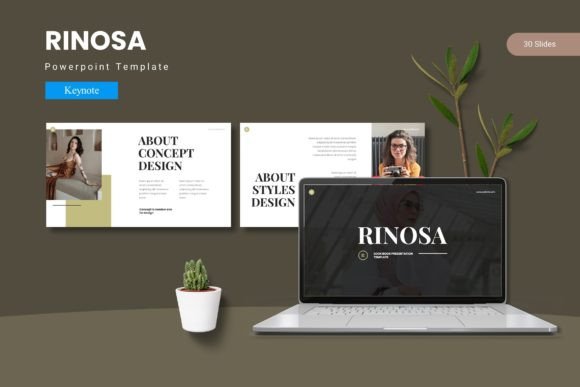
The Rinosa Keynote Template is a pre-designed presentation framework built for Apple's Keynote application. It includes 150 total slides organized across five distinct color variations, with 30 slides per template set. The package provides section break slides, handcrafted infographics, master slide-based layouts, and pixel-perfect illustrations that remain resizable and editable after import. Additionally, the template includes picture placeholders with drag-and-drop functionality, gallery and portfolio slide types, and five color scheme options stored in a single folder alongside a readme file and font information.
Rather than offering a single look, Rinosa gives users multiple stylistic paths within one download. This structure allows for consistency across presentations while offering flexibility to match brand colors or event themes. The inclusion of master slides means that changes made to one slide can propagate across related slides, which can save significant time during the editing phase.
Slide Count and Structure
With 150 slides spread across five color variations, the template provides enough material to cover most standard presentation needs without requiring users to build slides from scratch. The 30-slide sets per color are intended to function as standalone decks, which can be useful when you need to produce multiple presentations that share a similar layout but differ in color coding—for instance, different departments within an organization or different client brands.
Master Slide Dependency
Rinosa relies on Keynote's master slide system. This means formatting choices made at the master level automatically update all slides using that master. For users familiar with this workflow, it is a clear advantage: you can adjust font sizes, background colors, or placeholder positions in one place and see those changes reflected throughout the deck. However, if you prefer to heavily customize individual slides independently of a master hierarchy, this structure may feel restrictive rather than helpful.
Infographics and Illustrations
The template includes handcrafted infographics and pixel-perfect illustrations that are fully resizable and editable. For presenters who regularly communicate data-heavy content, having pre-built chart elements, icons, and diagram components can reduce the time spent searching for external visuals. The editability also means you can adjust colors, labels, and sizing to match your specific dataset rather than being locked into a preset design.
Picture Placeholders
The drag-and-drop picture placeholders simplify the process of inserting images. Instead of manually cropping or resizing photos to fit a layout, you import your image into the placeholder frame, and the template automatically adjusts the composition. This is particularly useful when working with team members who may not have extensive design experience, as it reduces the risk of misaligned or poorly scaled images.
Color Variations
Five pre-made color schemes are included, each applied across a full 30-slide set. Having multiple color options within one purchase means you can evaluate which palette works best for your content without buying additional templates. That said, the color schemes are predetermined; if your organization uses a specific brand palette that does not closely match any of the five options, you will need to invest time in recoloring elements manually.
Who Benefits Most from This Template
The Rinosa Keynote Template is a strong fit for professionals who need to produce presentations regularly and value consistency across their slide decks. Marketing teams, sales professionals, consultants, and educators who present to external audiences often benefit from templates that enforce a uniform visual language. The inclusion of gallery and portfolio slides also makes it relevant for creative professionals—photographers, designers, or agencies—who want to showcase work in a structured format.
Another group that may find Rinosa useful includes individuals or small teams who do not have dedicated graphic design support. When you are responsible for both content creation and visual design, having a template that handles layout decisions can free up cognitive energy for message development. The drag-and-drop image placeholders and editable infographics lower the barrier to producing visually competent slides without requiring advanced design skills.
Organizations that deliver presentations across multiple events or clients may also benefit from the five color variations. You can assign a different color scheme to each client or campaign while maintaining the same underlying layout, which reinforces brand recognition without requiring a full redesign each time.
Considerations and Potential Tradeoffs
While the Rinosa template offers clear advantages in terms of structure and consistency, it is not without tradeoffs. One consideration is platform dependence. Because the template is built exclusively for Apple Keynote, users who work across Windows and macOS teams or who need to share editable files with colleagues on PowerPoint may encounter compatibility issues. Although Keynote can export to PowerPoint, some formatting elements—particularly master slide relationships and custom fonts—may not transfer perfectly. If your workflow requires seamless cross-platform collaboration, this is a factor worth evaluating before committing.
Another consideration is the degree of creative flexibility. Templates, by their nature, impose constraints. While Rinosa offers resizable and editable assets, the overall layout and structure are pre-defined. If you prefer to start with a blank canvas and build slides that are highly unconventional or experimental, a template may feel limiting. The value of a template lies in reducing decision fatigue, but that same benefit can become a drawback if you need to break the template's visual rules frequently.
The 150-slide count, while generous, includes 30 slides per color variation. This means that the actual unique slide layouts within a single color set is 30, not 150. The total count reflects the multiplication across color schemes, not entirely distinct layouts. Be sure to evaluate whether 30 unique slides per color set provides enough variety for the types of presentations you typically deliver. For short decks, 30 slides may be more than sufficient. For longer, more complex presentations, you may need to supplement with additional custom slides.
Font licensing is another practical detail. The template includes font information within the readme file, but it does not necessarily include the fonts themselves. You may need to purchase or download the recommended fonts separately, depending on their licensing terms. Always verify font availability and cost before building a presentation that relies on specific typefaces.
Scenarios Where Alternatives May Be Worth Considering
If your presentation needs involve frequent collaboration with users who do not have access to Keynote, a platform-agnostic template (such as one built for PowerPoint or Google Slides) may reduce friction. Similarly, if your organization enforces strict brand guidelines with exact color values, typography rules, and spacing specifications, you may find that customizing a pre-built template to meet those standards takes nearly as much time as building from scratch. In that case, a brand-specific template built by a designer who works from your guidelines could be a more efficient investment.
For presenters who deliver highly data-intensive content, such as financial reports or scientific research, the infographics included in Rinosa may not offer the level of granularity or chart type variety needed. Specialized data visualization tools or templates designed specifically for academic or financial presentations might better serve those use cases.
If budget is a primary concern, there are free Keynote templates available through Apple's own template store or through community resources. These may not offer the same level of polish or the structured color variations that Rinosa provides, but they can be adequate for internal presentations or low-stakes meetings where visual polish is less critical.
Practical Decision-Making Insights
When evaluating whether the Rinosa Keynote Template aligns with your goals, start by considering your workflow:
- How often do you present? If you deliver presentations weekly or monthly, the time savings from a template that provides consistent layouts and placeholders can be substantial. For infrequent presenters, the learning curve of mastering a new template may outweigh the benefits.
- Who is your audience? External-facing presentations to clients, partners, or conferences typically benefit from professional design consistency. Internal team updates may not require the same level of polish, making a simpler template or no template at all a viable option.
- What is your team's design skill level? If you or your colleagues are comfortable working in Keynote and understanding master slides, Rinosa's template structure will feel intuitive. If the team is less experienced, you may need to invest time in training or choose a template with simpler customization paths.
- Do you need multiple color schemes? If you frequently tailor presentations to different brands, events, or internal teams, having five color variations in one download is practical. If you use only one color scheme consistently, you may be paying for variations you will not use.
- How important is cross-platform compatibility? If your presentation files need to be edited by colleagues using PowerPoint or Google Slides, test the export quality with a sample slide before committing to a full deck built in Keynote.
Another practical step is to review the 30-slide layouts within a single color set. Compare them against the types of slides you commonly use—cover slides, agenda slides, content slides, data slides, transition slides, closing slides—and assess whether the template covers your needs or leaves gaps that would require custom creation.
Finally, consider the total cost relative to the time it saves. If a template costs a fraction of what you would bill for an hour of custom design work and it saves you several hours per presentation, the return on investment is clear. If the template requires significant customization to fit your needs, the time savings diminish accordingly.
Evaluating Fit Beyond Features
Beyond the feature list, the decision to use Rinosa—or any template—should also account for how it affects your presentation process. Templates can impose a certain visual rhythm on your slides, which can either enhance or distract from your content. A well-designed template, like a well-designed room, should support the activity taking place within it without drawing attention to itself. If the template's design choices—such as heavy use of color blocks, decorative elements, or complex infographics—compete with your message rather than reinforcing it, then even a technically polished template may not be the right choice for that particular presentation.
It is also worth considering the audience's expectations. In some industries, a highly designed template signals professionalism and attention to detail. In others, it may be perceived as overly slick or corporate, potentially undermining the authenticity or directness of the message. Understanding your audience's preferences and expectations can guide whether a structured template like Rinosa adds credibility or creates distance.
For presenters who value the ability to iterate quickly, the master slide structure can be a genuine efficiency gain. When a stakeholder requests a global font change or a color adjustment, you can make that change once and update the entire deck in seconds. That kind of flexibility is harder to achieve with manually built slides or with templates that do not fully leverage master slide relationships.
Ultimately, the Rinosa Keynote Template is a tool designed for a specific set of use cases: regular presentation work, audience-facing decks, and users who work primarily within Apple's Keynote environment. It offers structure, consistency, and multiple visual paths, all of which can reduce the time and effort required to produce polished slides. The tradeoffs involve platform dependency, design constraints, and the need to align the template's visual language with your specific content and audience. By evaluating these factors against your own workflow and presentation goals, you can determine whether Rinosa supports your needs effectively or whether an alternative approach would serve you better.